Practical guide
Two-Color Logo Palettes That Also Work in Monochrome
Design the shape before depending on two hues. Keep a two-color master, a deliberate one-color version and a reversed version for suitable dark surfaces. Compare the original SVG examples, choose a palette pair, inspect the actual small-size export and record the backgrounds and production instructions for each variant. A grayscale preview, a black digital fill and a supplier-approved print proof answer different questions.
Define the three versions before choosing the palette
A two-color logo system needs more than two attractive swatches. Write down where the mark will appear: a website header, a small app or browser icon, a receipt, a photocopy, a light package, a dark package or a single-ink print job. Decide which versions those uses require before choosing production files.
Use a color master for the intended full-color setting, a deliberate one-color variant for uses that cannot depend on two hues, and a reversed variant for appropriate dark surfaces. Grayscale is another preview you may find useful, but it is not identical to one-color artwork. Gray tones can preserve differences that disappear when all shapes use the same ink.
Keep the mark’s geometry, its wordmark if any, and surrounding interface text as separate decisions. The original example below is a symbol with no company name. It demonstrates a method; it is not an existing identity, a trademark-clearance result or a claim about measured audience recognition.
Compare the original color, one-color and reversed SVGs
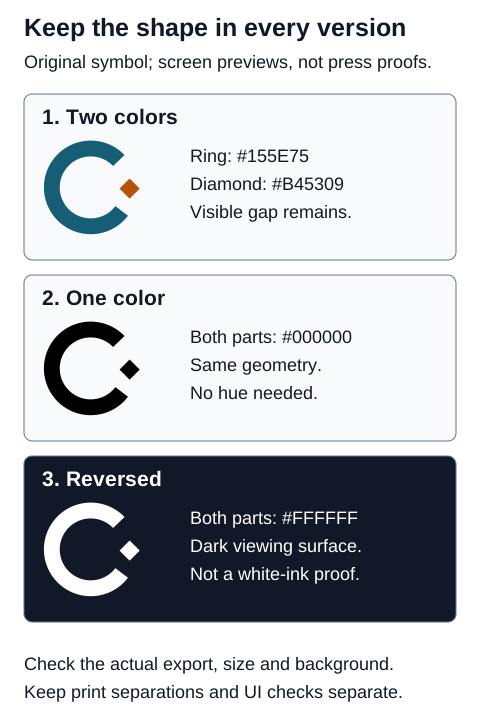
The ring has an opening and the diamond sits in that opening without touching the ring. Those contours and the visible gap remain when both components use black or white. If a distinction is necessary to the design, do not make its only cue the change from teal to copper.
This is not a rule that every logo needs disconnected parts. A continuous silhouette can be appropriate. The useful question is whether the intended mark still reads as intended in the required variant. Avoid adding accidental background rectangles, fine outlines or transparent overlaps merely to rescue a shape that has not been designed for its real uses.
Three original palette pairs with separate text checks
| Pair | Ring color | Diamond color | Computed text contrast on #FFFFFF | Design note |
|---|---|---|---|---|
| Teal and copper | #155E75 | #B45309 | Ring 7.27:1; accent 5.02:1 | A darker ring and warm detached diamond. |
| Navy and rose | #1E293B | #E11D48 | Ring 14.63:1; accent 4.70:1 | A dark structural color with a brighter accent. |
| Slate and ochre | #334155 | #A16207 | Ring 10.35:1; accent 4.92:1 | A restrained pair; shape remains the identifying cue. |
These are original starting suggestions, not colors taken from famous brands. Apply the ring color to the large structural part and the accent to the detached diamond, or make another deliberate assignment. Keep the roles consistent in the version you approve. A palette can be distinctive without assigning equal visual weight to both colors.
The ratios describe each listed opaque color against white, using the WCAG sRGB relative-luminance method. They are not a score for the whole logo, a test of print reproduction or a comparison of the two colors with each other. All six results exceed 4.5:1 before rounding when used as ordinary text on that specified white background; a different surface or transparency needs a new calculation.
The logotype exception does not make these numbers irrelevant to the surrounding page. Prices, menu descriptions, form labels and supporting text still need their own decisions. Use a documented text color for those roles rather than borrowing whichever logo accent is most attractive.
Make the one-color shape intentional
Inspect all important contours in the one-color variant. Look for merged overlaps, closed openings, lost counters in letters, thin strokes and components that appear unrelated. Ask what information each part is supposed to provide. If the original needs color to separate two areas, redesign that boundary or decide that the merged silhouette is the intended one-color mark.
Do not confuse a visible white cutout with a transparent gap. A white object can cover a colored background; transparent space shows the background through it. Choose the required construction consciously and inspect it on more than one approved surface. The downloadable symbol uses a true open gap between the paths and no background rectangle.
If different colored parts represent different services or states, supply a visible name, shape or another usable cue where that meaning matters. W3C’s Use of Color criterion concerns information, actions and distinctions conveyed by color. A logo palette is not a substitute for a labelled service selector, error message or status legend.
Check reversed placements and the actual smallest export
The reversed sample has white paths and a transparent background. Its appearance depends on the surface beneath it. Use it on the agreed dark background or a documented treatment; do not assume it will remain visible over a bright photograph, a changing video frame or a pale package.
Check the actual smallest use at its delivered size. A 160-pixel SVG canvas does not mean the mark will appear at 160 pixels in a header or favicon. Inspect the gap and diamond after the actual export and placement. For a wordmark, inspect letter counters and spacing as well. Do not infer a universal minimum from the sample.
If the small use needs simplification, create and name a deliberate small-size variant. Record where it replaces the full mark and keep the relationship clear. A changed component or stroke can change the identity; do not silently rely on the browser or print process to make that decision for you.
Keep the logo exception separate from interface checks
W3C’s Contrast Minimum explanation states that text forming a logo or brand name has no contrast requirement under that criterion. It also says that other text constrained by brand guidelines is not exempt. Do not extend the exception to menu descriptions, labels or a page’s ordinary reading content.
The same explanation discusses logos acting as links or controls and recommends a suitable variant or equivalent interface component. It also warns about an author choosing unnecessarily low contrast until hover. Check the actual implementation, including the home-link purpose and focus state, rather than labelling every treatment acceptable because the artwork is a logo.
Ordinary text normally uses a 4.5:1 threshold; qualifying large text uses 3:1. Judge thresholds using the unrounded calculation and the actual size, weight and background. None of those checks alone establishes full WCAG conformance. Visible meaning, accessible names, keyboard use and other aspects require their own review.
Two visible colors are not necessarily two printing inks
Adobe’s color-separation guide explains process plates and spot inks: process output commonly uses cyan, magenta, yellow and black, while each spot ink has a separate plate. A logo with two visible sRGB colors can therefore involve more than two process plates. Its hex values do not establish an economical two-ink print job.
Tell the supplier which physical result is required and agree who specifies or converts the colors. Ask for the correct ink arrangement, substrate, final file format and proof revision. Inspect the actual separations where relevant. A black SVG fill does not by itself prove K-only output, and a white SVG fill does not establish opaque white ink on a dark material.
Keep rich black, registration color and an agreed single black ink distinct. Adobe describes rich black as black mixed with process color and registration color as appearing on all plates. Do not choose registration color to make a logo look darker on screen. Get the supplier’s requirement for the actual job.
On-screen separation preview can reveal useful problems, but Adobe lists limits involving trapping, marks, halftone screens and resolution. Use the screen-to-print guide, and keep a supplier-approved proof separate from these screen examples.
Six practical decisions before approval
These invented cases show how to apply the variant checks. They are not outcomes of print jobs, recognition studies or software tests conducted by this site. Choose a next action before opening each explanation.
Case 1
Your symbol is two overlapping colored discs. In a one-color version it becomes one undifferentiated outline. Has exporting black solved the problem?
Show answer and explanation for case 1
No. Redesign the needed separation rather than relying on the original hue boundary.
Decide what must be identifiable in the mark, then inspect the actual one-color silhouette. A gap, changed contour or separate component can preserve a distinction when both parts have the same fill. The sample uses a broken ring and detached diamond for this reason. Do not add a white rectangle to a transparent file as an accidental repair: it may cover an unintended area when placed elsewhere. Inspect the exported result on its stated background and keep any geometry revision intentional.
Case 2
The colored symbol looks clear on white. You change every fill to white and place the file on a pale photograph. Is that an appropriate reversed use?
Show answer and explanation for case 2
Not without a suitable, controlled surface and a check of the final placement.
A reversed variant is designed for an appropriate dark viewing surface; it is not a universal way to place a logo on any photograph. Bright areas may hide the white shape. Use the approved variant or an agreed background treatment, and inspect the entire mark at its actual size. Keep that treatment in the usage sheet so the next person does not improvise a different patch or shadow. The dark panel in the comparison is a screen illustration, not evidence that an arbitrary material or photo will work.
Case 3
A supplier says a two-color logo exported as a CMYK PDF still has four process plates. Does two visible colors prove two ink plates?
Show answer and explanation for case 3
No. Agree the ink specification and inspect the actual separations with the supplier.
Adobe explains that process output commonly separates cyan, magenta, yellow and black, while each spot color has its own plate. Two visible sRGB colors do not establish two printing inks. Ask who performs the conversion, which inks are intended and how the final file will be checked. Inspect the agreed file revision rather than counting the swatches on a screen. Do not silently convert the design to guessed CMYK percentages or call a digital black fill a verified K-only plate.
Case 4
The logo is a brand logotype. Can the same pale accent be used for small menu descriptions without further contrast checks?
Show answer and explanation for case 4
No. The logotype exception does not extend to unrelated menu or interface text.
W3C explicitly distinguishes logo or brand-name text from other text constrained by corporate identity. Check each actual menu description, price and label against its own background. Ordinary text normally needs at least 4.5:1 under Contrast Minimum; qualifying large text has a separate 3:1 threshold. Use the unrounded result to judge the threshold. A logo’s brand status is not a reason to make a price hard to read, and a passing text pair is still only one part of the page’s accessibility review.
Case 5
A 160-pixel source SVG looks neat, but the detached diamond is difficult to identify in a 16-pixel favicon export. Which size should control the decision?
Show answer and explanation for case 5
Review the actual 16-pixel use and create a deliberate small-size variant if needed.
The source canvas is not the display size. Inspect the raster or vector export at the intended size and in the intended interface, including the gap and the smallest component. Our sample has no tested universal minimum size. Enlarging a screenshot does not show what the original small icon looks like. A simplified variant may be useful, but document how it relates to the full mark and which contexts use it. Recheck its shape rather than removing a component and calling the result equivalent automatically.
Case 6
The supplier approves a black sample on light paper. Does that approve the white reversed artwork on a dark material too?
Show answer and explanation for case 6
No. Obtain a separate decision for the dark material and the required production method.
White in an SVG is a screen fill, whereas a physical result may require a substrate knockout, an opaque white ink, an underbase or another agreed method. The right arrangement depends on the supplier and product. A light-paper black proof does not establish opacity or detail on a different material. Record the exact variant, surface, file revision and approval before ordering. Adobe notes that on-screen separation preview also has limits; it does not replace checking production settings with the print shop.
Download the SVGs and record the approved uses
Download the two-color symbol SVG, one-color black SVG, reversed white SVG, or the labelled comparison SVG. The reversed file has transparent surroundings and needs a suitable dark viewing surface. These learning assets are not press-ready specifications.



Use the variant review and supplier handoff sheet to record the exact file revision, color roles, background, smallest delivered size, intended surface and unresolved production questions. It includes the palette calculations and all six cases with explanations.
Approval should identify a variant in a particular use, not just say that the logo looks good. Keep any unresolved item visible. When a color, background or geometry changes, update the relevant checks and the file revision before passing the artwork to the next person.
Sources and further reading
- W3C: Understanding Contrast Minimum, WCAG 2.2 SC 1.4.3Logotype exception and its limits, logo control guidance, ordinary and large text thresholds, unrounded decisions and the sRGB relative-luminance formula.
- W3C: Understanding Use of Color, WCAG 2.2 SC 1.4.1Visible alternatives when color carries information, actions or distinctions; limits of color-only and assistive-technology-only cues.
- Adobe Illustrator: Print Color SeparationsProcess and spot ink plates, separation preview limits, rich black, registration color and working with the print shop.